Adventures in Unhandled Exception Handling for XNA/Silverlight

here on codeplex – http://bit.ly/JmuXTE
The normal way for XNA
XNA acts like any normal program when it runs on windows or XBOX, there is a main “Program” launch point where you can wrap some logic to catch the fallen game should it crash, when it happens we do something about it, we can either:
Store the Error and show it to the use when they next launch the game (or show it immediately)
Give the user the ability to email or send the error report via a web service (or even do it silently but I would not recommend that) – Note XBOX has no connectivity unless you are XBLA so this option is limited on XBOX
The principle is quite simple, just put a Try/Catch Loop around in the Program class:
Create New XNA Project in solution, for example “UnhandledExceptionReporter”
Rename Game.cs to “MyErrorHandler” (or something like that) and rename the class inside
Be sure to update all code that uses the class, like the Program.cs in the error handler project and the constructor in the game class
Add a SpriteFont to the ErrorHandler Content project (not your game project)
Add a Property to the ErrorHandler Game class to store the Error Text
In Load Content Load the Sprite Font
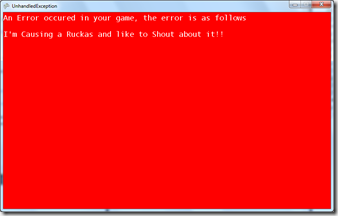
In the Draw Loop Draw the error text
Your Game class should now look something like this:
To finish this implementation off just update the previous error handling code to now call your new Error handler instead, thus:
), I would recommend extending it further to include your own text or test data to trap when and where the error occurred, consider it homework!
Enter Little Watson
Now while I was implementing my own error handler in my Phone projects i came across a tweet of a little sample class that helps out with error reporting, cutely called “Little Watson”. It is written by Andy Pennellon an MSDN blog here – http://bit.ly/JhZLKP
It is very neat and instead of having a separate project it just saves the error and next time you run your project it can email the error report to you (useful for phone projects when you publish to get users to give you more info than the pesky AppHub error reports), this was nice but with a few minor modifications it can be made to also display it to the screen and can even be customised for the XBOX.
AdRotator samples I have used a modified version of Andy’s Little Watson class so I can just view the error instead sending it, semantics really but it is how I roll, so the final little watson class I used (which is different to the XBOX/Windows one above because we have more resource available) was:
So you are left with either the “Initialised” function or the “LoadContent” it is up to you really, just add the following code where you thing it is more appropriate for your game (I prefer the initialised function BTW):